
Attachment reference
HiveBoard has 12 attachment designs evaluated in 13 conditions. The ball valve is evaluated without and with a friction ring, giving two conditions for the same attachment design. The conditions belong to three task categories.
See Terminology for the task names, trial IDs, and names used in older files.
For operating instructions, use How to perform each task. It includes the starting state and reset for each mechanism, with a step-by-step shock absorber task.
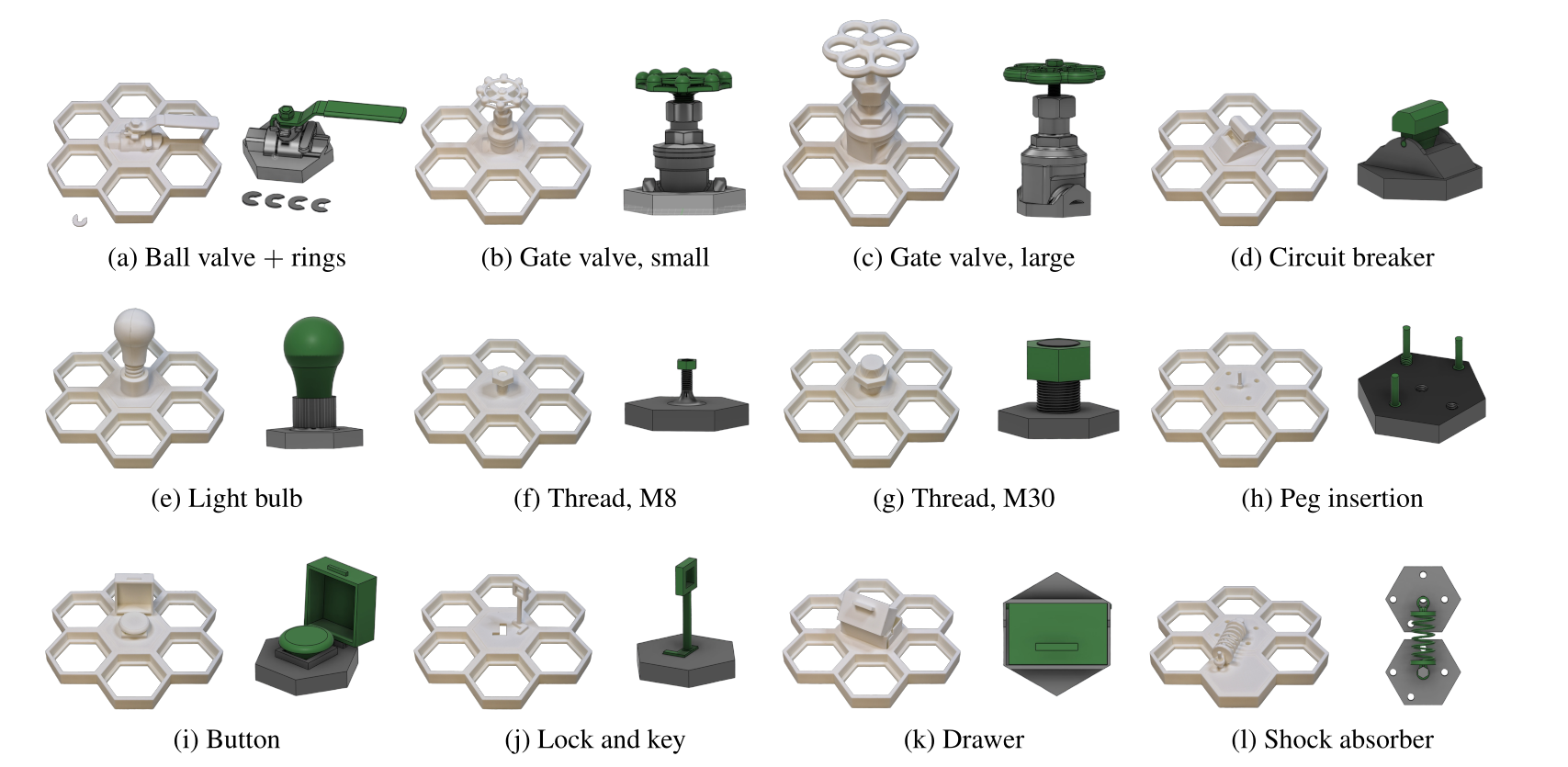
Torque-based tasks
| ID | Attachment | Required outcome | Timeout |
|---|---|---|---|
valve_ball | Ball valve | Rotate the handle 90° from closed to open | 60 s |
valve_ball_ring | Ball valve + ring | Rotate the handle 90° with the ring fitted | 90 s |
valve_gate_small | Gate valve (small) | Complete one full turn of the stem | 90 s |
valve_gate_large | Gate valve (large) | Complete one full turn of the stem | 120 s |
circuit_breaker | Circuit breaker | Move the toggle to the other state and hold it | 60 s |
The gate-valve criterion is one complete stem rotation, not full travel. The number of turns required for full travel can vary with the printed thread pitch.
Precision-based tasks
| ID | Attachment | Required outcome | Timeout |
|---|---|---|---|
light_bulb | Light bulb | Thread the bulb until it is seated | 120 s |
thread_m8 | Thread (M8) | Thread the bolt along the available length | 120 s |
thread_m30 | Thread (M30) | Thread the bolt along the available length | 120 s |
peg_insertion | Peg insertion | Thread the free peg into the empty socket until seated | 120 s |
The peg task uses a threaded 8 mm pin. It is not a clearance-fit insertion task.
Composed assembly tasks
These tasks are scored by the last completed stage as well as by full success.
| ID | Attachment | Stage 1 | Stage 2 | Stage 3 | Timeout |
|---|---|---|---|---|---|
button | Button | Open cover | Press button | — | 60 s |
lock | Lock and key | Grasp key | Insert key vertically | Rotate to unlock | 180 s |
drawer | Drawer | Grasp handle | Pull open | Push closed | 120 s |
shock_absorber | Shock absorber | Grasp pin | Align with hole | Insert fully | 180 s |
Record 0 when no stage is completed. A full success reaches the final stage listed for the attachment.
Printable files
The attachment folders and their components are available under STL/. The same high-level folder names are used under CAD/ and Simulation/ where the corresponding assets are available.